Showing posts with label technology. Show all posts

Friday, September 18, 2015

5 Tech-y things I'm loving right now

I am home with a yucky tummy bug.  Since I have now started feeling a little better, I decided to write a blog post.

Hmmm. . . what should I write about?  It's Friday so I would like to link up with Doodle Bug Teaching for Five for Friday.  But I like to have a theme to my posts.  I don't want to get out of bed to do anything so anything requiring creating/ decorating is out.  Maybe some computer things I like/ am using currently?  Okay, let's go with it!


 This is a nice Overview Video.  I love this Youtube channel for easy to understand directions. 

Not including a link as if you don't use Reading Street it's useless.  :)

 No links for this-- just play around in Excel just like Word or PowerPoint!


Monday, September 14, 2015

I won a new Cricut Explore!

Yay!  It is not here yet but here are some links to inspire me in the meantime!  (Some of these are only able to be done with the newer, bigger Cricut-- some I probably could have done already. . . but I haven't) 

Source
I need to decorate my school laptop-- just so I can easily tell it is mine and not another teacher's or for students.  I am excited about being able to lay out projects online before cutting them.  I am also excited about the 12 X 12 size-- I know most Cricuts are this size but my Cricut was only 6 X 12. 

Source

 I am not sure that I will do this exact project but I am super, duper excited that I will be able to cut my own fonts like this "Pass the Chex" font from Kevin and Amanda. 

Source
This new Cricut is also supposed to be super intricate-- it can cut stuff like the  banner above.  I don't plan on making that banner but I think that the cuts would make cute cards. 

Source
This is not really a Cricut project at all but it would go great with my newly decorated laptop.  Plus, it lets me highlight a new Cricut feature-- print then cut.  Basically you can print cutesy designs like above and then cut them out with your Cricut.  So pumped for this feature! 

So stay tuned for my wonderful posts about all the things I cut out with my new Cricut! 


Wednesday, August 19, 2015

Notes from a blog reader

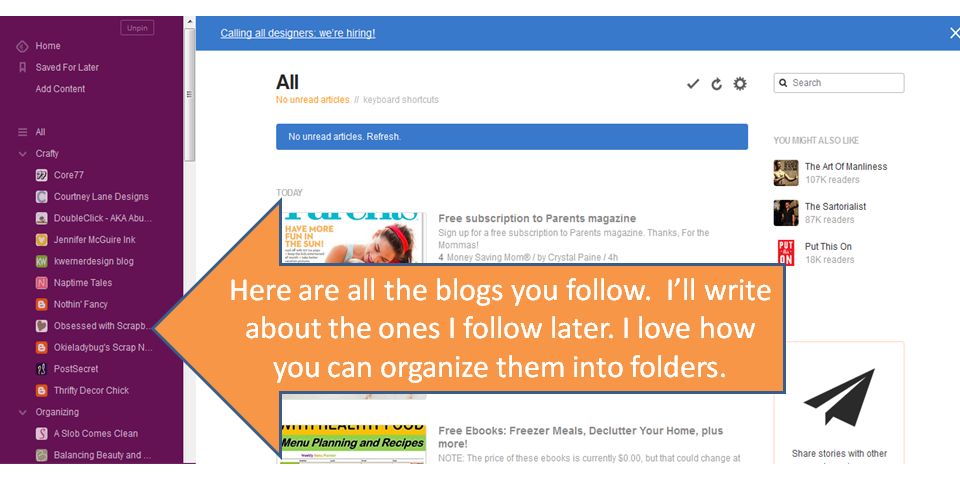
I may have started this blog in July but I am a longtime blog reader.  Let me show you how I keep track of blogs and what I like in a blog.  


I know some people subscribe to get e-mails sent with blog updates, some people just go to the website, and some people use other social media for updates (Facebook, Bloglovin, etc.).  I like to use the blog reader Feedly.  

Here is a really simple tutorial of it.  


That's it folks!  

Monday, August 17, 2015

Differentiated Literacy Centers

I got this book from another teacher years and years ago.  Since then, I've had to REALLY streamline things.  In just a year I went from a big, overstuffed classroom to a bookshelf to half a bookshelf to just having a desk area.  This change has been dramatic! 

So, instead of keeping this book at school, I made some digital files of the ideas I liked.  I'm not as great as some at digital creations but I enjoy it and keep learning new things! 


I'm planning on using this as a digital file only.  I will present it to my students and as they work through a text, they will have to write what the character does, says, and thinks.  I'll probably have them use this evidence to go a little deeper in the text and think about character traits.


This is such a simple response sheet.  I am thinking about using it in a couple of ways.  Maybe they could use post-its or annotate directly on text with these symbols.  Or maybe they can write about text they read using one or more of these prompts.  Or maybe I will actually print this out, cut these out as cards and then use a Kagan structure to get them to discuss it.


This chart is pretty self-explanatory.  I've mentioned before that my district just adopted Reading Street.  It has an online option to have the story read aloud.  I thought I could put this to use with some fluency practice.  It will take double the time so I will maybe just have them do it with selected pages.  (I need to figure out the logistics of this option).  I think I will teach them to do this in small group and then work with the classroom teachers on whether it makes sense to do this during independent time. 


English Language Learners sometimes have trouble with these question words (see other ESL posts here).  Plus, reciprocal teaching is HUGE in raising achievement.  I may cut these out and use them for students to ask each other questions.  Or maybe I'll just project and they write their questions as they read.


This is designed as a tic-tac-toe board for retelling stories.  You can ask 2 students to play together, taking turns going back and forth.  Or you can ask each student to connect 3 in a row on the board.


Very simple chart.  I'll project this.  They will recreate it in their notebook.  It's a version of FQR (google Fact Question Response for more information).  We will do the response part orally.

I like the "I see" wording as it can be used to view pictures, not just text.  This is great for building background with my kiddos.

I hope these creations gave you some ideas for what you can do with your kids!

I will say these charts all came from a probably 30 page section of the (200+ page) book.  There are lots of independent literacy center ideas in this book.  It's all about students being on task and accountable even when you are with your small group.  If you are looking for ideas, I would recommend it.  Even in 4th grade, many ideas can be used with modifications.  If you are a primary grades teacher, there are lots of making words/ sight words/ easy book ideas.   The reason I'm not keeping it at school is because it's really more for the classroom teacher.  It stayed though several elimination rounds though. 

Of course I'm linking up with 4th Grade Frolics!


Tuesday, July 21, 2015

Elementary ESL apps


Technology changes faster than a newborn growing up.  You feel like you start to understand something, get into a routine, and boom, you learn something totally new.  I used to pride myself on being up-to-date on technology-- now I have to ask youngsters for help.  Here are a couple of programs and apps that I've used in the past year.  They are ones that I feel classroom and non-classroom teachers can use.  (As a reminder, I'm now a push-in ESL teacher but was a classroom teacher for years).   I hope you find something new here! 


Toontastic- I just found out that Toontastic was bought out by Google.  Wow!  Anyways, Toontastic is an app (I have only used it on ipads).  You can choose or draw your own setting and characters and then you act it out.  It is really fun to see the characters come to life!  Here are three ideas to get you started-- retell a story, act out a reader's theatre/ play, and use it for a pre-writing activity.  It is simple to use and very engaging! 


Epic- This is a FREE online e-book app or website.  This program keeps track of how much a kid has read and has audio options for most of the books.  We also use services like Capstone and PebbleGo but your school needs to have a paid account for these. 


Popplet- This is an online graphic organizer app (I have only used it on ipads).  We use it to create webs about what we have read or for vocabulary organizers.  Kids are really engaged in learning/ creating with this!

Bitsboard- This app is basically a flashcard app but it's pretty awesome.  


I am linking up with Second Grade Sizzle for #techtuesday.